A note app becomes difficult to leave when your writing depends on its account, database views or special blocks. Before moving years of notes, ask a narrower question: can you take a representative folder away and still understand it? A successful download is only the beginning. The text must be readable, attachments present and important relationships recoverable.
This guide uses Obsidian on Windows 11 as a concrete candidate for personal notes. It stores Markdown files locally, so leaving usually means copying a folder rather than requesting an account export. That makes the escape route unusually easy to examine. The exercise below is a proposed rehearsal, not a reported hands-on test.
Write your exit requirements before choosing features
List what you actually need to carry forward: editable text, meaningful filenames, folders, pictures, PDFs and links between notes. Add tags or dates only if you use them to find things. Distinguish the information from its presentation: a project's decisions matter more than the exact arrangement of panes.
For a hypothetical household project, require three notes, one receipt PDF and one photo to survive. One note should link to another, and a sentence should contain an accented name. Five visible files are expected in this deliberately small example, excluding settings. This gives you concrete items to inspect without pretending that a file count proves completeness.
Use these same requirements when assessing another app. Can it export editable files in bulk? Are attachments included? Do nested notes remain distinguishable? Can you perform the export with your actual account permissions? An attractive PDF preserves a reading copy, but does not by itself establish an editable, linked collection you can keep working on.
Build a disposable collection with an obvious location
Obsidian's storage documentation describes a vault as a local folder containing plain-text Markdown notes. Other text editors can read those files. App preferences live separately inside the vault's .obsidian folder; the vault's name is not a cloud account or export format.
- In Obsidian, select the Vault profile control at the bottom left, then Manage Vaults.... Beside Create new vault, select Create. On first launch, the vault setup screen may already be open.
- Enter
ExitPracticeas the vault name. Select Browse, choose a local location you can identify in File Explorer, then select Create. Record the full resulting folder path. For this rehearsal, use a location outside folders already synchronized by another service. - Create three ordinary notes named
Overview,DecisionsandCosts. Put a short heading and a few distinctive sentences in each. Use disposable material throughout; keep your existing collection untouched.
The current vault-management instructions also document reopening an existing folder. If your menus differ, stop at that point and compare them with the official page. Do not substitute a move or remove command: neither is needed to create a separate practice collection.
Make links and attachments part of the collection
In Settings → Files and Links, turn off Use [[Wikilinks]] before creating the practice links. Obsidian's internal-link reference recommends Markdown links when interoperability matters. This choice affects generated links; it is not a bulk conversion of existing notes.
In Overview, add this simple link to the note beside it:
[Decisions](Decisions.md)Click the link in Reading view and confirm it opens Decisions. A plain editor will display the markup rather than a clickable page, which is acceptable for the first readability check. Before committing to another note app, test its interpretation of that same link; Markdown support does not guarantee identical navigation.
Using File Explorer, copy a disposable PDF and JPEG into the ExitPractice folder itself. For this example, name them receipt.pdf and room.jpg. In Costs, add [Receipt](receipt.pdf); in Overview, add . Check the PDF link and picture in Obsidian. Keep those files alongside the notes for this initial exercise, so relative paths are easy to inspect.
A pasted web address is not a local attachment. If a note depends on an online image or document, determine whether you have a lawful local copy and include it when appropriate. Copying the note alone cannot preserve access to somebody else's disappearing website.
Close the app and examine a separate copy
- Close Obsidian. In File Explorer, find the recorded ExitPractice folder and copy it to a separate location, naming the copy
ExitPractice-check. Keep it outside the original vault. Do not cut, move or overwrite your source. - In File Explorer, select View → Show → File name extensions if suffixes are hidden. Confirm the three notes end in
.mdand identifyreceipt.pdfandroom.jpg. A name such asOverview.md.txtneeds investigation.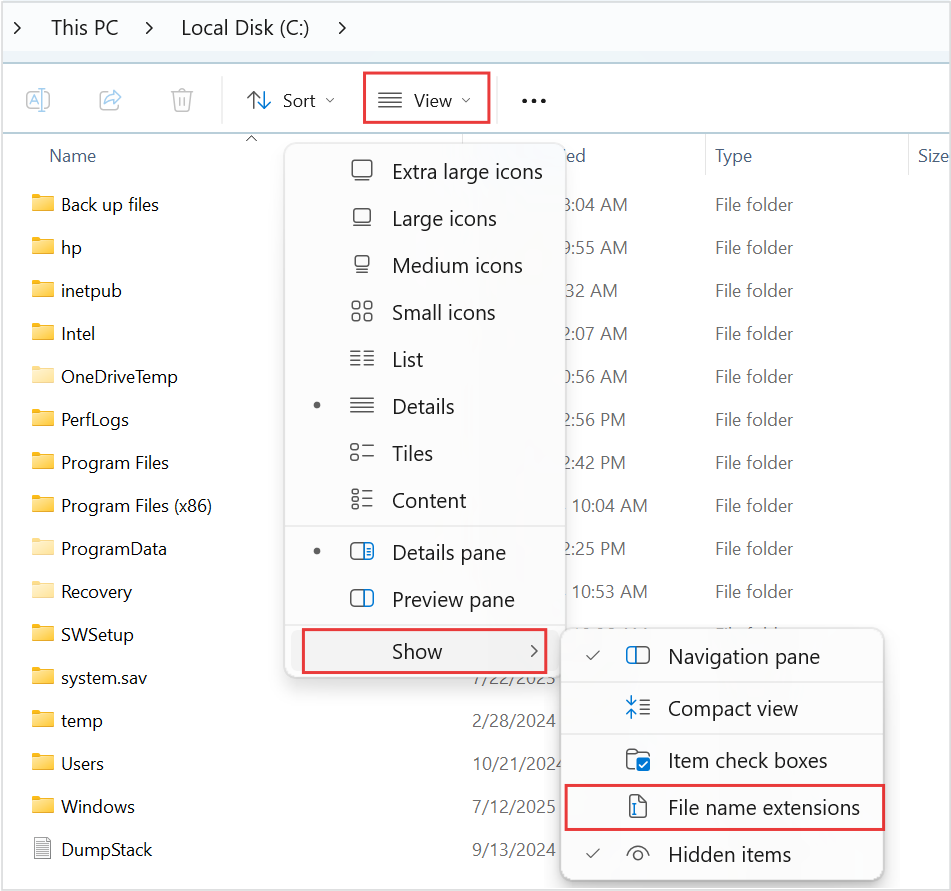
Visual 01 · Microsoft Windows 11 Microsoft Windows 11: locate View → Show → File name extensions before inspecting the copied notes. The option is unchecked in this vendor example; enable it in your own window. This is not the practice vault.
Microsoft Corporation. Official support screenshot; copyright retained by Microsoft. Image source · Usage termsVersion notes
Microsoft’s current Windows 11 file-extension instructions provide this Windows 11 command-bar and Show-submenu image. Complete downloaded asset retained, including the source’s red outlines. Exact Windows build is not stated. Initial menu state only; it does not show the article’s files or completed extension display. - Right-click a copied Markdown file and use Open with → Choose another app to open it in Notepad. Read the distinctive sentences, heading, accented name and link destinations. Close without saving changes. Open the copied PDF and JPEG in suitable local viewers too.
- Reopen Obsidian, return to Manage Vaults... and select Open beside Open folder as vault. Choose ExitPractice-check. Verify the three notes, internal link, PDF link and embedded picture in that copied vault.
Microsoft's extension guide documents both the extension-display control and the app-selection route. Renaming a suffix does not convert content. If a file is unreadable text or an unexpected format, return to the source and investigate rather than repeatedly changing extensions.
Decide what a failed check tells you
- Text survives, but the image disappears
- Read the image path in the copied note. Confirm the referenced file exists at that relative location. Copy the missing attachment from the source and repeat the check. Avoid rewriting every link before establishing what is absent.
- A note link creates an empty page
- Compare its destination with the actual filename and folder. A link to a missing note is not evidence that the original contents arrived. Stop and correct the sample before migrating a larger collection.
- The collection works only after enabling a plugin
- Identify what the plugin supplies. If an important summary comes from a query, keep its underlying facts in ordinary notes and consider saving a dated text summary. Plugin-dependent views need their own migration plan.
Obsidian explicitly warns that its block references are outside standard Markdown and will not work elsewhere. Ordinary note links offer a simpler starting point, but drawings, complex embeds and specialized workflows still need representative tests. Reopening the copy in Obsidian checks collection integrity; reading it in another editor checks a different, narrower promise.
Choose the app only after the exit route passes
Choose this approach if ordinary files satisfy your note-taking needs and the rehearsal preserves what matters. If another app better supports collaboration or capture, require the same small export-and-open exercise before committing. Record any losses you accept rather than discovering them during cancellation.
Keep the original collection until a real migration has passed these checks. A copied vault is useful for portability, but an adjacent folder is not protection against losing the drive. Include the collection in your separate backup plan. Repeat the rehearsal when you adopt a new attachment type or plugin: a previously simple collection can acquire new dependencies.
Sources, versions & scope
The steps describe the documented controls and expected checks; they are not a claim that every device or software release has been physically tested. Platform and version differences are stated with the procedure.