For notes you want to read years from now, choose UTF-8 text with a .txt suffix when paragraphs and simple lists are enough. Choose .md when headings, emphasis and links make the notes easier to use. Markdown is still plain text; its punctuation carries structure that a compatible reader can display.
The durable choice includes more than a suffix: characters must decode correctly, links must have destinations, and important facts must remain understandable without a particular app. This guide uses Visual Studio Code on Windows 11 for a small format exercise. It does not require a programming project or extensions. The sample and expected results are instructions to try, not a reported hands-on test.
Decide what the next reader must understand
Imagine opening a household repair note in an unfamiliar editor. Would a title, date, decision and list of outstanding work tell the story? Then ordinary text is enough. If the note regularly points to supporting documents or has several sections, a little Markdown can make navigation clearer while keeping the writing readable in its raw form.
| Choose | When it fits | What you accept |
|---|---|---|
UTF-8 .txt | Short records, logs and lists you read directly. | Headings and links are ordinary characters; presentation depends on the viewer. |
UTF-8 .md | Longer notes with headings and links you want rendered. | Readers can interpret extra features differently; keep essential meaning in basic text. |
Neither option preserves a word processor's page layout, tracked changes or comments automatically. If those are part of the record, retain the original document and an appropriate reading copy alongside any text summary. A plain-text note should state where that evidence lives.

Give Markdown a deliberately small vocabulary
The CommonMark specification documents core Markdown syntax and explains why implementations have diverged. For durable notes, start with headings, paragraphs, simple lists, emphasis, inline code and ordinary links. Leave blank lines between blocks, and prefer a single level of bullets until you need more.
A hypothetical note could contain:
# Kitchen repair

Recorded: 2026-10-31
Contact: José

## Decision
Repair the existing shelf before ordering a replacement.

## Next actions
- Measure the damaged board.
- Request a written quote.

Supporting document: [Quote](attachments/quote.pdf)
The words carry the decision even if a reader displays every hash and bracket. Avoid making a colored label, interactive checkbox or generated dashboard the only place a decision appears. Write “Decision: approved” or “Status: awaiting quote” as text when that distinction matters.
Tables, task lists, special note links, embedded queries and mathematical notation can be useful, but do not treat every feature described as Markdown as universally portable. If you adopt one, keep a short example and check it in the reader you expect to use next. A fallback sentence explaining the information is often cheaper to maintain than a dependency.
Save one note and check what you actually created
- Create a disposable folder named
NotesFormatPracticein a location you can find. In VS Code, press Ctrl+N for a new text file and type the sample, or your own non-sensitive equivalent. - Press Ctrl+Shift+S for Save As. Choose the practice folder, enter
kitchen-repair.mdand save. For the plain-text option, usekitchen-repair.txtinstead. Keep existing notes outside this exercise. - In Windows 11 File Explorer, enable View → Show → File name extensions. Check that the actual name ends in the intended suffix, rather than
.md.txt. The image below shows the option before it is enabled.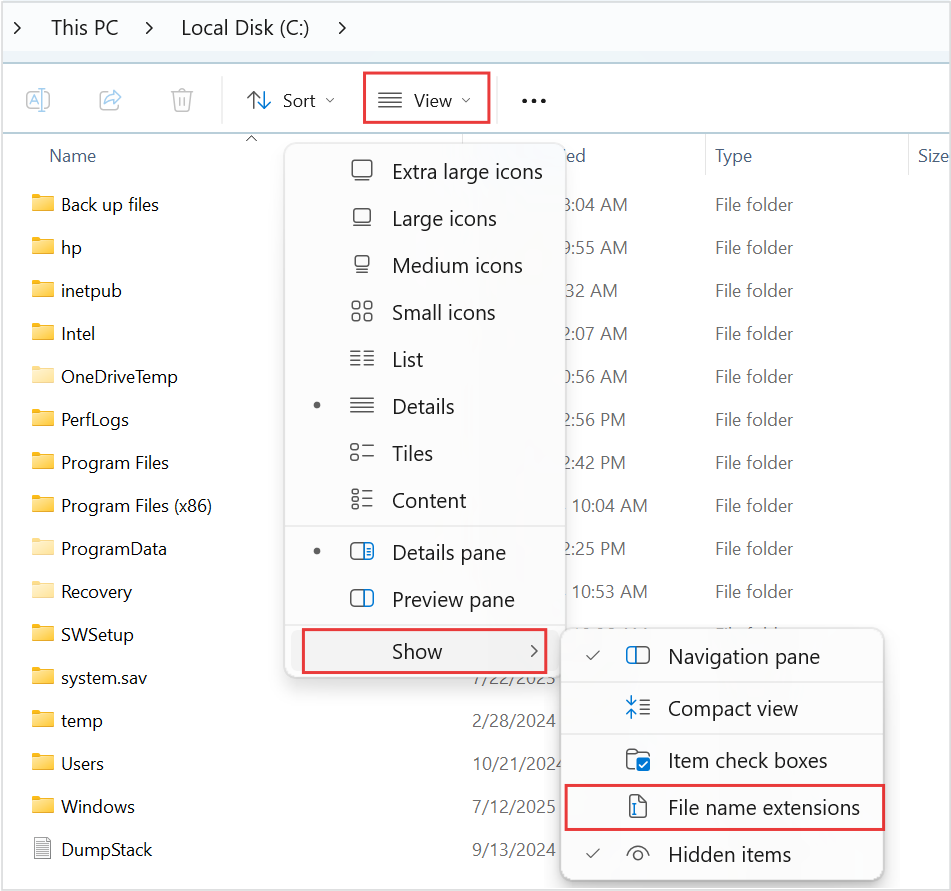
Visual 01 · Microsoft Windows 11 In Microsoft Windows 11, locate View → Show → File name extensions and enable it before inspecting .md or .txt suffixes. The vendor image shows the initial unchecked state; it does not contain the practice note.
Microsoft Corporation. Official support screenshot; copyright retained by Microsoft. Image source · Usage termsVersion notes
Microsoft’s current Windows 11 file-extension instructions provide this Windows 11 command-bar and Show-submenu image. Complete downloaded asset retained, including the source’s red outlines. Exact Windows build is not stated. Initial menu state only; it does not show the article’s files or completed extension display.
Microsoft's extension reference explains that changing a suffix does not convert a file. A genuine plain-text file can be renamed between .txt and .md, but that only changes how programs identify it; it does not add headings or recover formatting. Renaming a Word document to .md cannot turn its contents into text.
For a Markdown file, press Ctrl+Shift+V in VS Code to open its preview. Microsoft's Markdown documentation confirms built-in preview support. Expect the title and Decision heading to appear larger and the bullets to become a list. Return to the text tab to inspect the punctuation. A successful preview establishes rendering in this reader, not compatibility with every future app.
Treat encoding errors differently from formatting
Encoding is the rule for translating stored bytes into characters. Select UTF-8 for new notes, including notes with accented names or non-Latin writing. Seeing a readable English sentence alone is a weak check; include a real character you use, such as the accented letter in the sample's José.
VS Code displays encoding in the status bar. If the new sample is not UTF-8, click the encoding indicator, choose Save with Encoding, then UTF-8. Microsoft's encoding instructions distinguish saving from reopening. Save, close and reopen the sample; confirm the accented name still reads correctly.
If an existing note opens as garbled text, close it without saving and preserve a separate copy first. Use Reopen with Encoding on that copy to try the known source encoding. Once the text reads correctly, save a new UTF-8 copy under a different name. Simply saving already-garbled characters as UTF-8 can preserve the damage. If you do not know the original encoding, return to the source app or a backup rather than repeatedly overwriting the file.
UTF-8 does not encrypt a note or provide recovery. Someone who can read the file can read its contents; a readable format still needs suitable storage and backups.
Keep supporting files within reach
The sample link is intentionally incomplete until you supply a disposable PDF. Create an attachments folder inside NotesFormatPractice and copy a permitted sample there as quote.pdf. In the Markdown preview, try the Quote link and confirm it reaches that document, using a suitable viewer if prompted. If it fails, compare the spelling and folder path before changing the markup.
A relative path starts from the note's location. Keeping that relationship intact makes a folder easier to relocate. A path into a particular user's Downloads folder is a poor long-term reference. A web URL is useful context, but it does not preserve the remote page; record a descriptive title and the relevant facts in your own words.
When you rename an attachment, repair its references and check them again. Keep filenames consistent in capitalization too. The link label “Quote” is only a label; the destination inside parentheses determines which file is requested.
Write down the convention, then stop adding machinery
Add a short README.txt beside your notes: “Notes use UTF-8 Markdown. Dates use year-month-day. Supporting files live in attachments. Important decisions are written as sentences.” For a TXT collection, substitute “UTF-8 plain text.” This is your local convention, not a required standard.
Choose TXT if rendered structure adds little to your reading. Choose restrained Markdown if it helps you find and follow information. Before changing an existing collection, try representative copies and retain the originals. Undoing this exercise means closing the sample files and discarding the disposable folder; it does not require converting your real notes back.
Sources, versions & scope
The steps describe the documented controls and expected checks; they are not a claim that every device or software release has been physically tested. Platform and version differences are stated with the procedure.