Start in the other inbox
“Sent” is a useful status for an email and an incomplete status for a file handoff. The recipient might receive a message containing a file, a message pointing to a file, or a message pointing to a file they cannot open. Those outcomes can look surprisingly similar in the sender’s compose window.
Before choosing a delivery method, establish the recipient’s task: read in a browser, download for offline use, comment, or edit. Ask which email identity they will use and whether their organization accepts your proposed cloud service. A working link on your laptop cannot answer those questions.
The rehearsal below uses Gmail and Google Drive in a desktop browser, with a harmless PDF and an agreed test recipient. It is a proposed exercise, not a report of a transfer we performed. Keep confidential material out of the exercise; two authorized accounts you control can stand in for sender and recipient.
Route the file by what must arrive
| Recipient needs | Useful route | Acceptance evidence |
|---|---|---|
| A fixed, small document to retain | An ordinary attachment, if both mail systems permit it | The received copy opens and has the agreed revision |
| A large file to save locally | An approved restricted link with download permitted | The named recipient downloads and opens the file |
| Browser review without routine downloading | A restricted viewing link with applicable download controls | The intended account can preview; download restrictions match the agreement |
| Collaborative changes | A shared working document with an appropriate role | The recipient can perform the agreed commenting or editing action |
An ordinary attachment hands over a copy. Removing access to a cloud original later does not retrieve that attachment. A cloud invitation instead grants access to something held elsewhere; its usefulness depends on identity, permissions and continued availability. Decide whether that link should represent an evolving working file or an issued revision, and say which in the message.
Gmail’s Drive insertion dialog makes the distinction explicit: Drive link works with files stored in Drive; Attachment is available for files that are not native Docs, Sheets, Slides or Forms files. A native cloud document is not automatically a portable attachment merely because it appears in the email draft.
The size gate happens before the recipient’s access test
According to Gmail’s attachment documentation, personal Gmail accounts have a 25 MB attachment limit; work and school limits are set by the administrator. When total attachments exceed the applicable limit, Gmail substitutes a Drive link. Inspect the resulting draft rather than assuming the paperclip guarantees an attached copy. The receiving organization may impose different limits or block particular file types.
There is also a difference between file bytes and message bytes. Binary attachments commonly travel as Base64. RFC 2045 describes an encoding that turns each three source bytes into four characters, with padding for a final incomplete group. Message headers, line breaks and text add more.
For a hypothetical 12,000,000-byte file, the Base64 characters alone occupy 16,000,000 bytes: 12,000,000 ÷ 3 × 4. That is 12 decimal MB becoming 16 decimal MB before other message overhead. This illustrates expansion; it does not redefine Gmail’s advertised attachment allowance or predict the exact limit applied by another mail server.
If a message is rejected, retain the error and identify whether it names size, file type, policy or another cause. Use the recipient’s approved transfer route when necessary. Renaming a blocked file or disabling scanning is not a delivery solution.
Take both seats in a harmless delivery rehearsal
Create a one-page PDF named delivery-practice-r1.pdf, containing only “Practice revision 1” and an innocuous sentence. Keep the local original. Arrange the test before sending anything; an unsent draft can demonstrate composition, but a recipient session is needed to check actual access.
- Sender, attachment route: In Gmail, choose Compose → Attach files, select the PDF and wait for uploading to finish. Check the filename, enter the agreed test address and send a message titled “Attachment rehearsal.”
- Recipient, attachment route: Find the message in the test inbox and open or download its attachment. Confirm the revision text. If the message is absent, inspect Spam or an available organizational quarantine and any sender bounce notice before changing file permissions. Mail delivery has to be resolved first.
- Sender, link route: Upload the same PDF using Drive’s New → File upload. Use a private practice location you own. In Share, set General access → Restricted; add the exact test address as Viewer, then choose Send or Share. Check existing access as well: parent-folder permissions can grant additional access. These controls are documented in Drive’s sharing guide.
- Sender, message route: Compose a second Gmail message, titled “Link rehearsal.” Choose Insert files using Drive, select the PDF, choose Drive link and insert it. Inspect any access prompt before sending; keep the named audience. Tell the recipient this is revision 1 and whether downloading is intended.
- Recipient, link route: Open that message in a separate browser profile signed into the invited account. Follow the link, verify the PDF’s revision and try the agreed download action. Open the saved PDF locally. Record preview and download as separate results; a successful preview alone does not complete an offline handoff.
For the attachment, the evidence is a usable received copy. For the link, it is the invited identity successfully performing the required action. A sender’s upload completion proves neither. A signed-out browser can help reveal unintended public access, but cannot demonstrate that a particular invited account works.
Read the recipient’s failure precisely
“I need access.” Confirm the email identity shown in their browser against the invitation address. A person may receive mail at one address while their browser opens Drive under another. Correct a mistaken invitation only after verifying the intended address. Do not fix an identity mismatch by changing confidential material to anyone-with-link access.
“I don’t have a Google account.” Some organizations enable visitor sharing. The recipient opens the invitation, receives a verification code by email and enters it in the verification tab. That visitor session lasts seven days and can be verified again through the original invitation. Availability depends on the organization, and visitor sharing supports particular file types, including PDFs. If unavailable, agree an approved alternative; do not share credentials.
“It opens, but I cannot save it.” Download permission is a separate delivery requirement. Drive supports download and copy restrictions that can also reflect shared-drive settings or organizational rules. Ask the owner to inspect the file’s Share → Settings download controls. Do not grant editing rights as a workaround. If downloading is intentionally prohibited, browser access may be the authorized endpoint; an offline handoff needs a different approved arrangement.
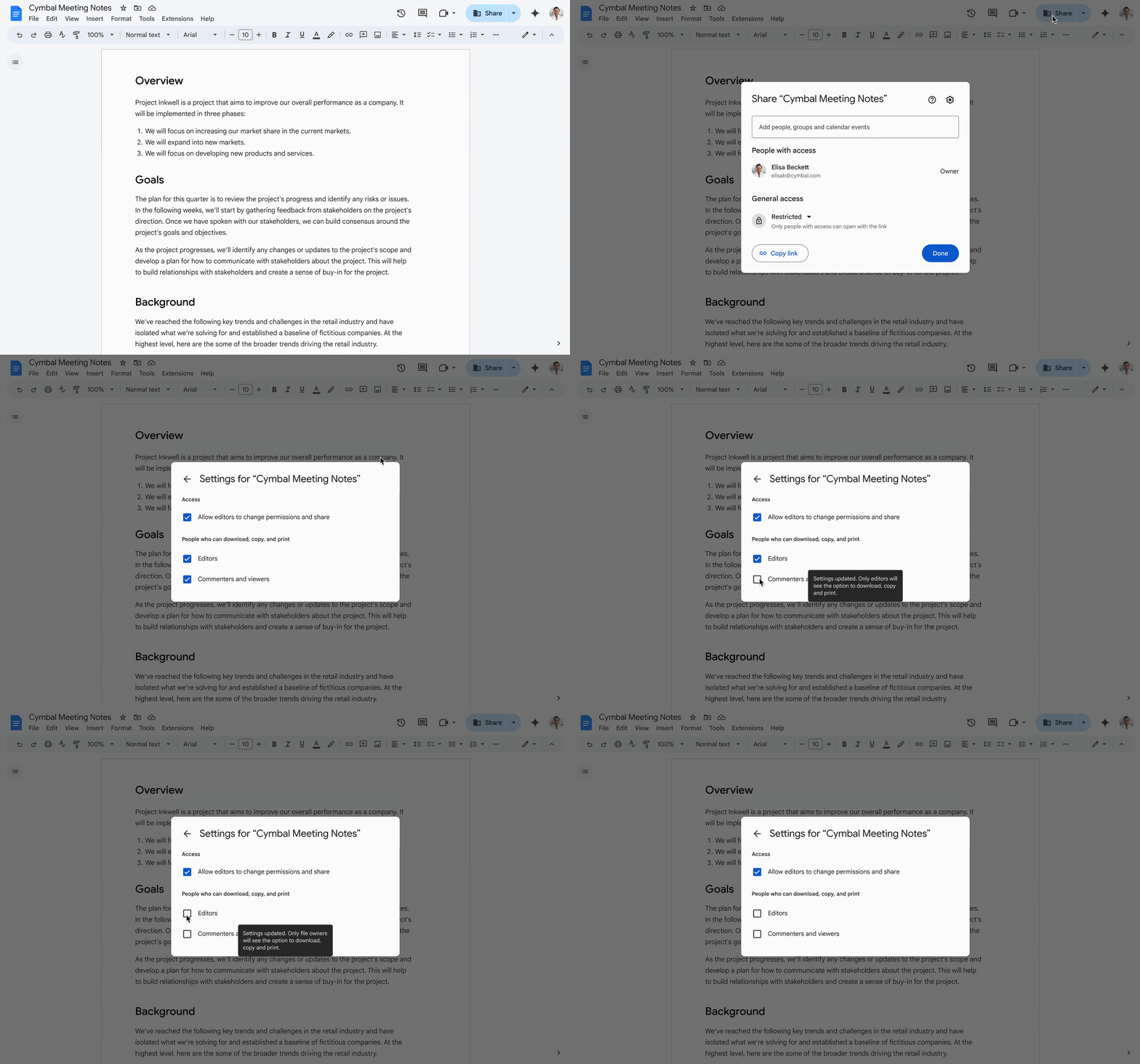
Open Share → Settings to inspect download permissions. Google’s animation shows the separate Editors and Commenters and viewers checkboxes, then turns restrictions on. Inspect the controls for your file before changing them.
Version notes
Google’s July 8, 2025 release demonstration shows the revised editor-inclusive download controls; rollout was expected to finish August 5, 2025. Current Drive Help independently documents both role groups under Share → Settings. Exact deployment/build is undisclosed. Vendor example uses a Google Doc, not the rehearsal PDF; no delivery test claimed. Complete 2244 × 1397 GIF preserved unchanged. Animation starts only when you choose Play. The static preview is the unchanged decoded frame at 7.5 seconds of the original animation.Sources, versions & scope
The steps describe the documented controls and expected checks; they are not a claim that every device or software release has been physically tested. Platform and version differences are stated with the procedure.
- Send attachments with your Gmail message
- Share and manage access to files and folders in Google Drive
- RFC 2045: Multipurpose Internet Mail Extensions (MIME) Part One: Format of Internet Message Bodies
- Send Google Drive attachments in Gmail
- Tips to access and find your files
- Share documents with visitors
- Protect file content