Would you release this device for erasure?
Imagine handing your phone or computer to someone who asks one question: “Can I erase this now?” A backup badge feels reassuring until you have to say what it contains, how you will open it and which account gets you back in. The useful answer is a small record of evidence.
Make a private reset release form outside the device being considered. Its purpose is to support a decision while the original still works. It is not a waiver accepting avoidable loss. This article ends with that decision; it never asks you to start a reset.
- Device and owner
- Record the model, operating-system version and whether you or an organization controls it.
- Requested outcome
- Write “repair for continued use” or “prepare for another owner,” then name the actual problem or destination.
- Decision
- Leave this as “on hold” until the evidence below exists. Record gaps beside the item they affect.
A work or school device needs its administrator’s approved process. If you are troubleshooting one malfunctioning app, write down why its supported repair options are insufficient. Readiness to reset does not establish that resetting will solve the problem.
“The files exist elsewhere” needs an opened file
Start with something you would actually miss: the edited document, an irreplaceable recording, the project with linked assets. Record its name, expected revision, independent destination and date checked. “External drive in the drawer” becomes useful evidence when you can locate and open the correct copy.
For an ordinary file backup, use a trusted second computer to open copies from the destination. For a backup application, use its documented preview or restore function and choose a separate destination where supported. Cancel any prompt that would replace your working originals. A cloud filename or thumbnail is insufficient: download or open the actual content and check meaningful details, including sound in a video or the latest changes in a document.
A phone’s whole-device backup is generally not a folder of individually readable documents. Record its completed backup date and documented restore route separately. Verify important files through supported exports or their cloud service; a spare compatible device can provide stronger restore evidence if available, but do not erase your only working device to stage that test.
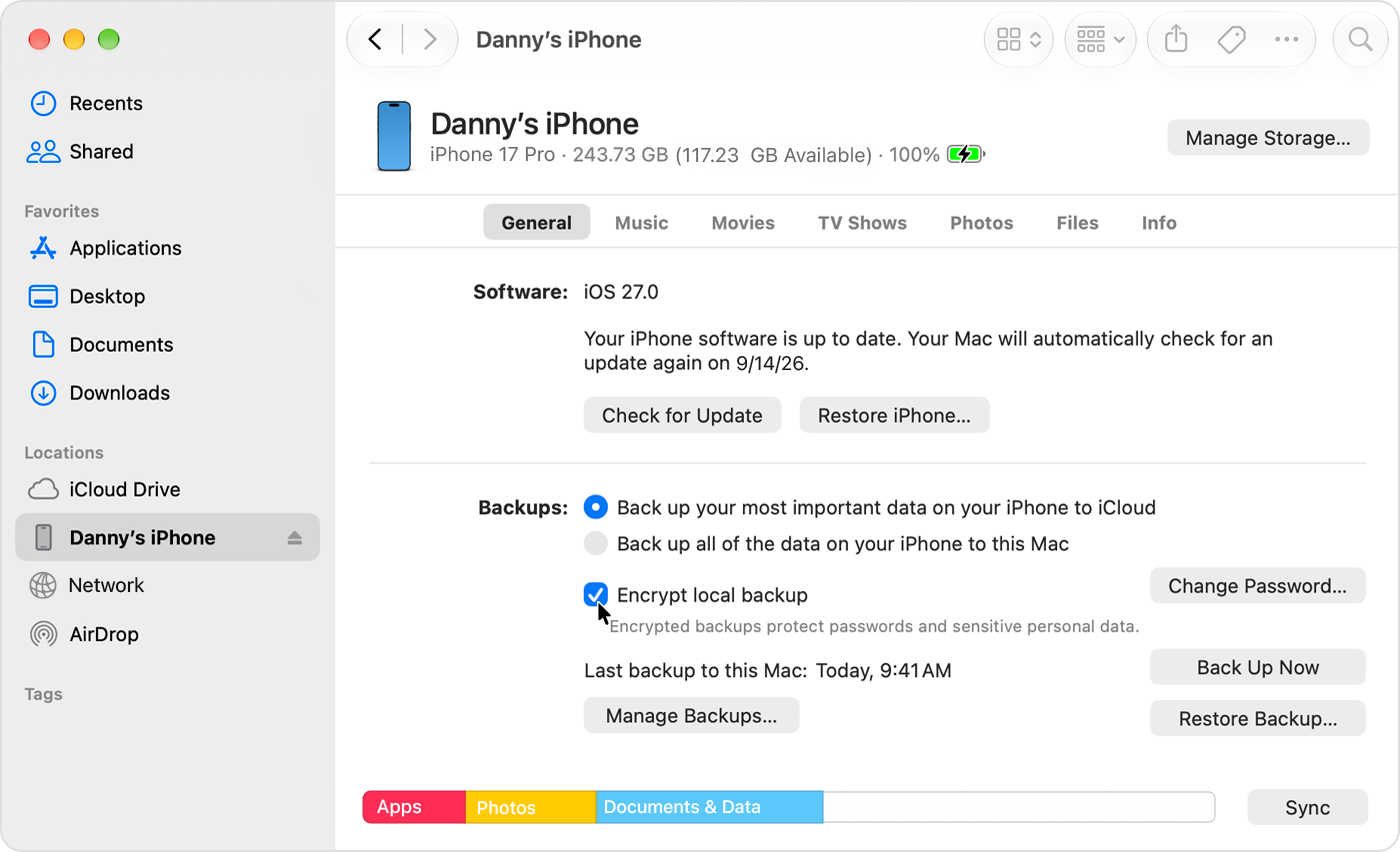
In Finder on macOS 27, inspect Last backup to this Mac and open Manage Backups to review the record. This Apple example shows an encrypted local backup; leave encryption and restore controls unchanged during the readiness review.
Version notes
Apple’s September 21, 2026 encrypted-backup guide links this macOS 27 Golden Gate asset. Finder visibly reports the connected iPhone’s iOS 27.0; exact macOS minor build is unknown. Vendor demonstration, not a hands-on restore test.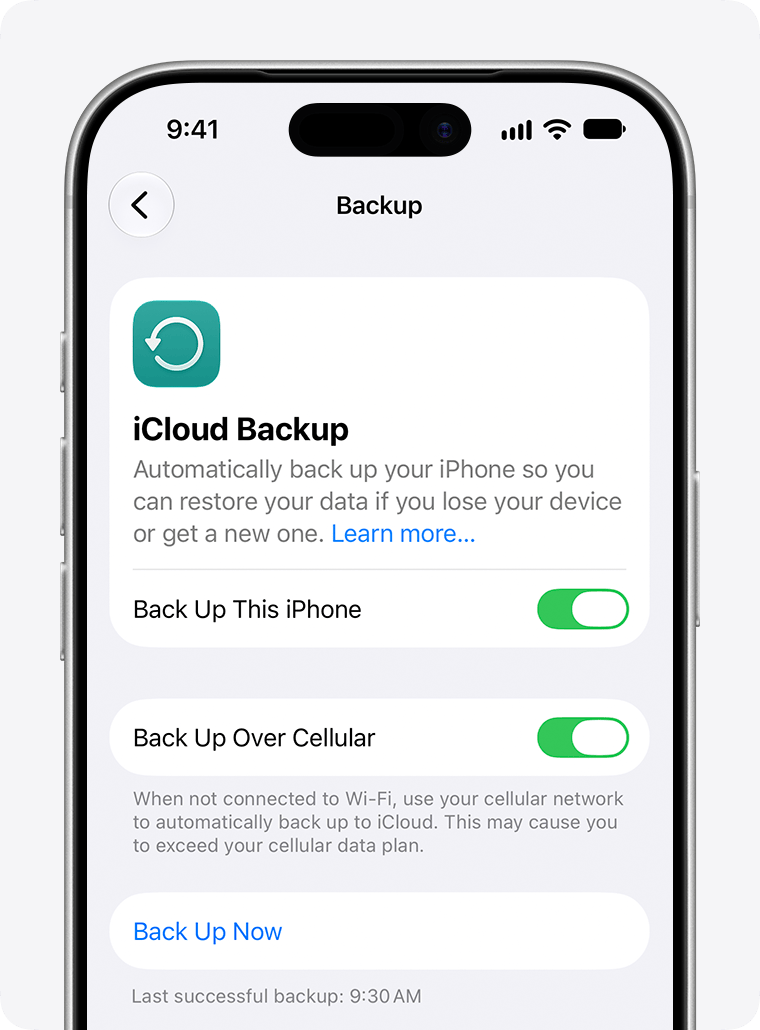
For an iPhone backed up with iCloud, record Last successful backup beneath Back Up Now. Apple’s example says 9:30 AM. That records timing only; verify important exports and account access separately before approving a reset.
Version notes
Official current support page links an explicitly ios-27 iPhone 17 Pro illustration. Exact minor version/build unspecified. Vendor example state only; no personal session or successful author test.Sampling establishes that those samples work. It does not prove every item is covered. Add local downloads, recordings, messages and specialist app libraries to the inventory. Ask each essential app’s developer what its backup includes. Google explicitly says not all Android apps can back up or restore all their data and settings in its Android backup guidance.
If original photographs matter, record fidelity as well as accessibility. Google Photos Storage saver and Express may compress or resize media. Upload completion and matching resolution do not prove an unchanged original. Changing future upload quality cannot reconstruct originals already altered; preserve separate original files before erasure when needed.
What a missing item blocks: if an important file cannot be independently opened or an essential app’s recovery route is unexplained, the form stays on hold. A large backup total cannot answer a question about one missing project.
“I can sign in” must survive losing this screen
List the setup account, primary email account, password manager and essential services. On another trusted device, visit each provider’s genuine sign-in page and complete a new authorized sign-in. Seeing an inbox in an existing browser session proves less than entering through a route you will retain after reset.
Look closely at the second factor. Does approval appear only on the phone you plan to erase? Is the password manager unlocked only by that phone’s biometrics? Is a passkey available elsewhere under its provider’s supported arrangement, or tied to this device? Record a working independent route, such as another enrolled device, a supported security key or securely retained recovery codes. Do not disable multifactor protection to make the form easier to complete.
Keep the old device signed in during this investigation. If a test reveals a forgotten password or an inaccessible recovery address, use the provider’s account-recovery process while your remaining access is intact. Recovery delays belong in the schedule, even if a buyer or repair appointment is waiting.
Google’s factory-reset preparation specifically asks you to confirm the Google Account password on another device and know the phone’s screen lock. It currently advises waiting 24 hours after resetting the Google Account password before a factory reset. Check the phone manufacturer’s requirements too.
What a missing item blocks: without a usable independent sign-in route, you cannot establish that setup and essential accounts will remain accessible. Repeating a reset will not recover a forgotten credential.
A password is not every recovery key
Give encryption recovery its own entry. On a Windows computer using BitLocker, follow Microsoft’s recovery-key guidance to locate the appropriate record from another device. Match the device information and key identifier where available. An organization may hold the key; a personal account containing some keys does not establish that yours is among them. Microsoft Support cannot recreate a lost key.
Do not deliberately trigger a recovery screen to test the record. Record its secure storage location without putting the full secret in a shared readiness note. If the computer still opens normally, use that opportunity to preserve readable files before attempting repairs that might interrupt access.
An encrypted iPhone or iPad backup on a computer introduces another credential. Apple’s encrypted-backup documentation says the backup password is needed to use it. In Finder or Apple Devices, Manage Backups lets you inspect the backup record, including its lock indicator and date. Those observations show encryption and timing; they do not demonstrate that you know the password or that every app will restore. Do not change encryption settings merely to test them: Apple notes that enabling encryption overwrites the previous backup.
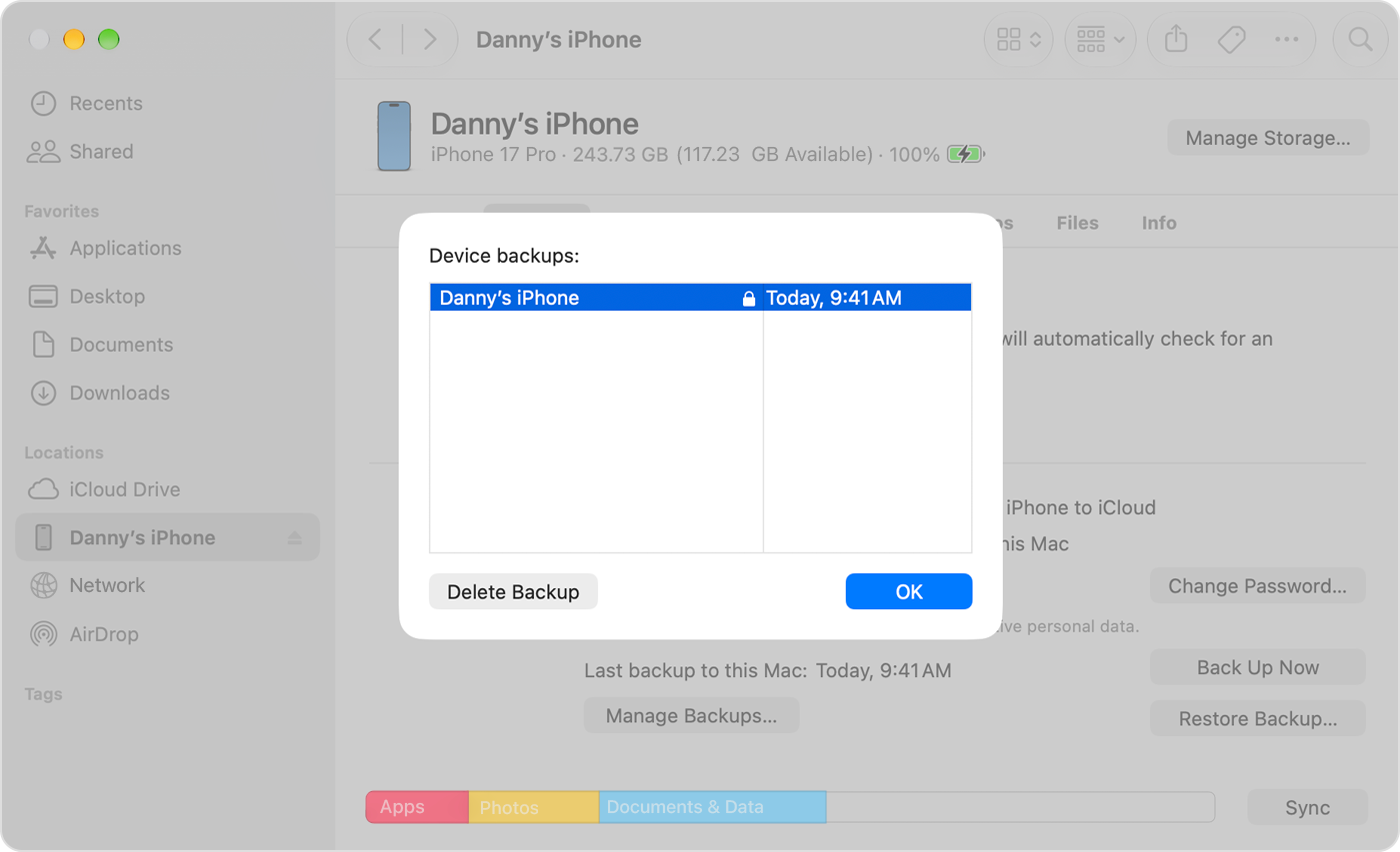
Finder’s Manage Backups dialog on macOS 27 shows the backup’s lock indicator and date. Record those observations and choose OK to close the list; they do not establish password knowledge or successful restoration.
Version notes
Apple’s current encrypted-backup guide links this macOS 27 Golden Gate image. The underlying Finder view identifies iOS 27.0 on the connected iPhone; exact macOS minor build is unknown. No restoration test performed.What a missing item blocks: an unavailable applicable recovery key or backup password leaves that recovery route unproven. Account login, device unlock and backup decryption belong in separate entries.
Attach the procedure you would actually use
Record the official support-page address, applicable model or hardware class, operating-system version and intended outcome. Read it without operating the erase controls. This is where a vague request to “factory reset” becomes a specific proposal you can assess.
| Device | Question before release |
|---|---|
| Windows 11 PC | Does the selected recovery option retain personal files or remove them? Which apps and settings disappear? |
| iPhone or iPad | Is this repair or handover? Have backup, account association and cellular-service implications been addressed? |
| Mac | Does this hardware and macOS version support Apple’s simpler erase feature, or require the alternative procedure? |
| Android phone | What does this manufacturer require for this model, including account verification and recovery? |
Microsoft’s Reset your PC documentation distinguishes Keep my files, which removes apps and settings while retaining personal files, from Remove everything. Neither is an independent backup. Its consumer data-cleaning option also does not meet government or industry erasure standards.
Apple’s Mac handover instructions limit Erase All Content and Settings to macOS Monterey 12 or later on Apple silicon or a Mac with the T2 Security Chip. The page provides another route for other Macs. A familiar-looking menu from someone else’s machine is inadequate evidence.
For an iPhone or iPad leaving your ownership, read Apple’s handover guidance, including associated devices and services. Do not manually delete synced photos or documents to clear the departing phone: Apple warns this can delete them from iCloud and connected devices. Plan phone-number and cellular-service continuity before the only receiving device disappears.
What a missing item blocks: without an applicable official procedure, you cannot approve the proposed removal or ownership transfer. Do not substitute an improvised button sequence.
The decision can remain “on hold”
Consider a hypothetical release form: the documents open on another computer, the backup password is securely available, and the manufacturer’s procedure matches. However, email sign-in still requests approval on the departing phone. The decision remains on hold, with one specific task: establish and verify an independent authentication route through the provider’s supported process.
Before dating the decision, account for work created since the evidence was gathered. A newly edited project needs a fresh verified copy. Keep the backup and recovery material accessible outside the reset device, and allow time for restoration, software installation and checking essential work.
When every essential entry is supported, write “ready for the documented procedure” with the date and intended outcome. That is permission to consider a later deliberate reset, not an instruction to begin one now. Close the review with the original device intact. An unresolved entry is a named piece of work to finish while that option still exists.
Sources, versions & scope
The steps describe the documented controls and expected checks; they are not a claim that every device or software release has been physically tested. Platform and version differences are stated with the procedure.
- Microsoft: Find your BitLocker recovery key
- Microsoft: Recovery options in Windows
- Microsoft: Backup, restore, and recovery
- Microsoft: Reset your PC, Windows 11 instructions
- Apple: Back up iPhone
- Apple: Factory reset iPhone or iPad
- Apple: Before selling, giving away or trading in iPhone
- Microsoft: Reset your PC
- Apple: About encrypted backups on your iPhone, iPad, or iPod touch
- Apple: What to do before you sell, give away, or trade in your iPhone or iPad
- Apple: What to do before you sell, give away, trade in or recycle your Mac
- Google: Reset your Android device to factory settings
- Google: Back up or restore data on your Android device
- Google Photos: Choose the backup quality of your photos & videos