Write down the failure before giving it a name
“DNS is broken” is a conclusion. “The booking site fails in Firefox while another site opens” is an observation you can investigate. Start a private incident note with the time and time zone, the affected hostname, the browser’s exact error, and your connection: home Wi-Fi, office Ethernet, or a required work VPN. Those details survive the moment when a retry suddenly works.
This notebook uses Windows 11 and Firefox desktop for its named controls and commands. The comparisons also help elsewhere, but they are not instructions for macOS, mobile browsers, or router administration. You need no administrator window, downloaded utility, or configuration change.
For a running example, imagine a booking site that stops opening on a laptop. Every observation below is hypothetical; no outage or test result is being reported. Keep three ideas separate in your own notes: what happened, what it suggests, and what you still need to ask.
Entry: what did the browser actually receive?
Read the address bar and error page. Record the hostname, not an entire booking or sign-in URL containing personal details. Check that the spelling matches the service’s known address. If a redirect led to another hostname, record that distinction privately rather than assuming the original name failed.
DNS supplies information associated with names; one familiar answer is an address for a website. A resolver obtains that information, potentially using cached records rather than asking the authoritative servers responsible for the domain again. The distributed naming model in RFC 1034 explains why this is a separate job from serving the page.
A name-resolution error makes the naming path worth investigating. A connection timeout leaves more possibilities open. A certificate warning belongs in a different column: preserve the warning and do not click through. An HTTP 503 response means an HTTP participant has answered that the service is unavailable; it is different evidence from a failed lookup. It might come from an intermediary, so it does not prove the origin application is reachable. These distinctions follow the connection and response model in HTTP Semantics.
- Observation
- The hypothetical laptop displays a name-resolution error for the booking hostname.
- Interpretation
- There is evidence to investigate naming, but no evidence yet that the router or provider caused it.
- Next question
- Does the failure follow this hostname, this browser, or the whole device?

Entry: change the comparison, keep the connection
In the same browser, open one familiar, permitted public site. Then open the affected hostname in an already installed, approved second browser on the same laptop. Record whether a new page loads or which exact error appears. An already open tab is weak evidence: it may still display content fetched earlier.
If the second browser succeeds, concentrate the next inquiry on differences between applications. If both fail only for the booking site, check that service’s official status page through a known route. If several unrelated sites fail in both, the scope is broader; the laptop’s connection and resolver reachability become useful questions.
Another owned device on the same Wi-Fi adds evidence, provided you note whether it also uses a VPN or a different browser. A phone on mobile data changes the network route as well as the device. Success there establishes an alternative that works, without isolating the failing component at home.
For an internal work name, retain the required VPN and ask whether that name should resolve in your current connection context. Use the full hostname supplied by your organization when available. A short name that works at the office may depend on a local search suffix; a failure away from that environment does not establish a public DNS outage.
Entry: ask one DNS question
On Windows 11, open Start, search for Command Prompt, and choose Open. In the ordinary window, type this public demonstration and press Enter:
nslookup example.com.To investigate your incident, replace example.com. with the exact authorized hostname, retaining the final period for a fully qualified name. Enter the hostname only, without https://, a slash, or a page path. The period avoids search-suffix ambiguity. With no second server argument, the tool uses its default DNS server, as documented in Microsoft’s nslookup reference.
Privately note the reported server and whether the target receives addresses or an error. Read the target result separately from the resolver’s display name. If the tool is blocked, record that limit; there is no need to elevate privileges. If it reports a timeout, allow the command to finish and keep the wording rather than running a loop.
Call the result a DNS query from nslookup. Microsoft’s DNS client troubleshooting guidance states that this tool does not use the client’s DNS cache. A browser can therefore fail while this query succeeds, or load a previously resolved destination while the query fails. The two observations need explaining; neither invalidates the other.
Entry: preserve the difference between silence and refusal
Do not collapse every unsuccessful result into “no DNS.” A timeout says the query did not obtain a timely response. It leaves open resolver trouble, filtering, packet loss, and a wider connection failure. A reply containing an error shows a different kind of exchange.
RFC 1035 distinguishes name error, server failure, and refusal. A nonexistent-domain result reports that the queried name does not exist in the responding DNS view; first verify spelling and whether an internal name reached the intended resolver. Server failure means the server could not process the query, not that the hostname has necessarily been deleted. Refusal signals a policy decision. It is a reason to ask the network owner about access, not to bypass the policy.
An address answer narrows the question without completing the diagnosis. DNS success does not test the subsequent secure connection or the application. Keep using the normal hostname in the browser; pasting an address into the address bar changes the test and can cause certificate or virtual-host routing problems.
- Observation
- In our hypothetical incident, nslookup returns an address and the approved second browser loads the booking site, while Firefox still reports a naming error.
- Interpretation
- The evidence now favors investigating the Firefox path. It does not justify a household-wide resolver replacement.
- Next question
- What does Firefox report about its own DNS configuration?
Entry: read Firefox’s DNS status
Open Firefox’s menu, choose Settings, then Privacy and security. Scroll to DNS over HTTPS and open Advanced settings if shown. Record the displayed protection level, status, and any policy notice without changing them. If the layout differs, search Settings for “DNS” and consult Mozilla’s current protection-level instructions.
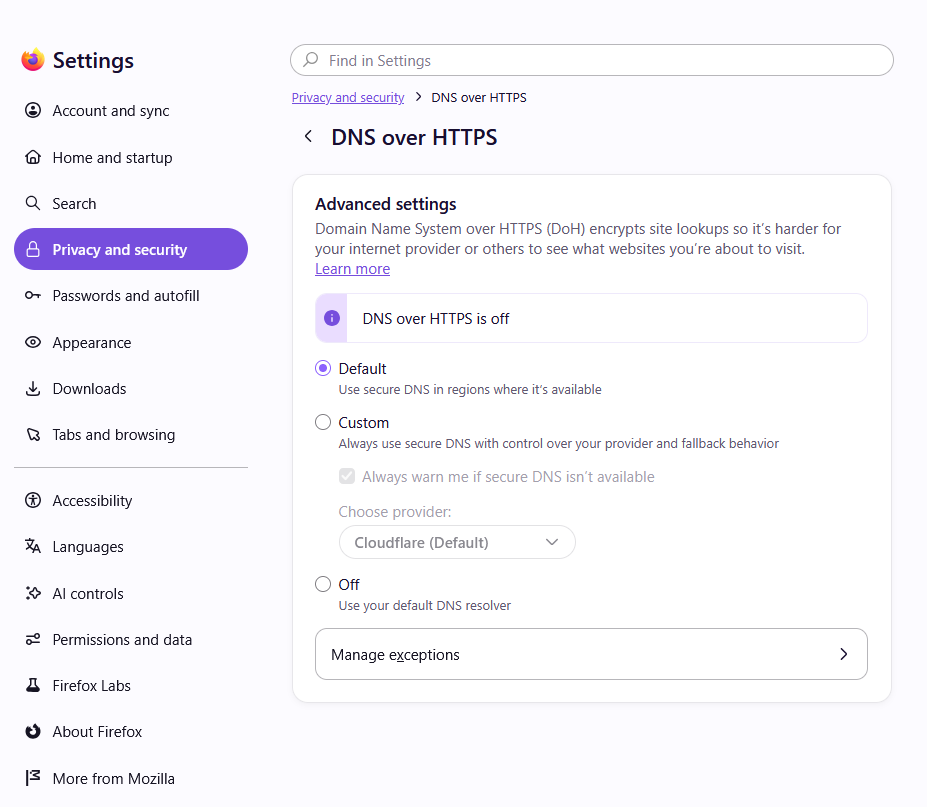
Record the level and status separately. Mozilla’s example has Default selected while the status says DNS over HTTPS is off. The provider controls under Custom are disabled here; this image does not establish which resolver your own connection uses. Leave the controls unchanged during the diagnosis.
Version notes
Downloaded from the current Mozilla Help page with159 as the selected release. The exact gallery asset is dated7 October 2026 and labelled fx157dnsoverhttps; the current 159 guide uses it for the same released controls. Firefox 159.0 was released27 October 2026. This is not the older held Nightly or four-level settings image; its bytes are different. Exact patch capture unknown.Firefox can send encrypted DNS queries through a different path from the command-line query. Mozilla documents fallback for Default protection and conditions, including enterprise policy, that can keep DoH inactive. Consequently, “Not active” alone does not establish a fault. Likewise, an active status does not prove that one failed hostname received the right answer. Record the displayed facts without inferring a cause from the protection level.
In the hypothetical notebook, this is where an administrator can compare the browser configuration with the intended network policy. Leave provider choices, exceptions, VPN settings, and router DNS untouched while gathering that evidence.
The final entry is a question someone can answer
A useful handoff might read: “At 14:10 local time, the booking hostname failed with this Firefox error on home Wi-Fi. The same hostname loaded in the approved second browser on this laptop. One default-server nslookup returned an address. Firefox showed the recorded DoH status. No settings changed. Can you check whether this browser is following the intended naming policy?” Replace the fictional time and findings with your own observations.
If the problem disappears, append the recovery time rather than rewriting the earlier entry. Cached records have lifetimes, so repeated queries need not represent fresh authoritative data; there is no universal waiting interval for every service change. Keep the note focused on the failing hostname and observed response categories. A full browsing history or configuration dump is unnecessary for this first report. Close the command window and Settings: the investigation has produced a narrower question without leaving a network change to undo.
Sources, versions & scope
The steps describe the documented controls and expected checks; they are not a claim that every device or software release has been physically tested. Platform and version differences are stated with the procedure.
- RFC 1034: Domain Names — Concepts and Facilities
- Microsoft Learn: nslookup
- Mozilla: Configure DNS over HTTPS protection levels in Firefox
- Microsoft: Essential network settings and tasks in Windows
- RFC 1035: Domain Names — Implementation and Specification
- RFC 9110: HTTP Semantics
- Microsoft Learn: Troubleshooting DNS clients
- Firefox 159 current released desktop version,27 October 2026