A recording archive, an eight-minute wait?
Imagine a colleague sends you a recording archive marked 2.5 GB. Your connection is sold as 40 Mbps. Can you have the file in eight minutes? Before answering, follow the archive through three descriptions: the bytes it contains, the bits those bytes represent, and the seconds needed to deliver them. The units will tell you which operation belongs next.
This is a hypothetical download, with invented inputs rather than measured performance. For the first calculation, the archive contains exactly 2,500,000,000 bytes and arrives at a steady 40,000,000 bits per second of useful file data. We will question that rate later. For now, giving it a precise meaning lets us check the arithmetic without confusing it with a promise about a connection.
The archive stays the same; its unit changes
A byte contains eight bits. The capital B in MB/s means bytes; Mbps, also written Mb/s, means megabits per second. The prefix mega supplies a multiplier of one million in these decimal units. NIST’s binary-prefix reference explicitly distinguishes these quantities and their binary counterparts.
Our archive starts in bytes, but our rate counts bits. Multiply 2,500,000,000 bytes by eight bits per byte to obtain 20,000,000,000 bits. Nothing has been added to the archive. We have counted the same contents with a smaller unit, just as measuring a length in centimetres produces a larger number than measuring it in metres.
Now divide those 20 billion bits by 40 million bits per second. The result is 500 seconds. You can see why division is right by keeping the units visible:
2,500,000,000 bytes × (8 bits / byte) = 20,000,000,000 bits
20,000,000,000 bits ÷ (40,000,000 bits / second) = 500 seconds
Bytes cancel in the first line. Bits cancel in the second, leaving seconds. This is dimensional analysis: the labels help verify the calculation. Multiplying file size by transfer rate would leave a nonsensical combination of units rather than a duration.
Five hundred seconds is eight minutes and twenty seconds: eight groups of 60, with 20 left over. Even under our steady-rate assumption, the archive misses the eight-minute deadline. Dividing 500 by 60 gives 8.333… minutes; the digits after the decimal point are fractions of a minute, not seconds.
Make your calculator earn your trust
You can reproduce the result without downloading anything. On Windows, open Start, search for Calculator, select the app, then use its navigation menu to choose Standard. These are the controls documented in Microsoft’s Calculator instructions. On another platform, any calculator with multiplication and division is sufficient; the Windows menu names do not apply there.
- Clear the display and enter
2500000000 × 8 =. Expect20000000000. Write “bits” beside that number on paper. - Divide that result by
40000000and press equals. Expect500. This is the transfer duration in seconds. - Start a fresh calculation:
40 ÷ 8 =. Expect5. The equivalent rate is 5 decimal MB/s. - Clear again and enter
2500 ÷ 5 =. Expect500again, because our decimal archive is 2,500 MB. This second route keeps everything in bytes.
Enter digits without grouping commas to avoid locale ambiguity. If the two routes disagree, check the units before changing the answer. Dividing 2,500 MB directly by 40 Mbps gives 62.5, but that number is not the duration: bytes in the numerator have never been reconciled with bits in the denominator. The missing factor of eight explains the error.
A download application displaying 5 MB/s is therefore numerically consistent with 40 Mbps of file delivery. If it instead displays MiB/s, the prefix has changed: 5 MiB/s represents 5,242,880 bytes per second. Do not treat MB/s and MiB/s as interchangeable when checking an exact answer.
What if the label actually says GiB?
One GB is 1,000,000,000 bytes; one GiB is 1,073,741,824 bytes. GiB means gibibyte. If the colleague’s archive were exactly 2.5 GiB, it would contain 2,684,354,560 bytes. That is a different quantity of data from our original archive, even though both labels begin with “2.5.”
Hold the rate at 40 Mbps and repeat the same journey. The binary-sized archive becomes 21,474,836,480 bits, which takes exactly 536.870912 seconds at our assumed rate. The comparison isolates the effect of the size convention:
| Size definition | Exact bytes | Calculated duration |
|---|---|---|
| 2.5 GB | 2,500,000,000 | 500 seconds; 8 min 20 sec |
| 2.5 GiB | 2,684,354,560 | 536.870912 seconds; about 8 min 57 sec |
The extra 36.870912 seconds comes entirely from extra bytes. No network slowdown is needed to explain it. Conversely, expressing the original 2,500,000,000-byte file in GiB changes its displayed number, not its contents or transfer time.
For an ambiguous or rounded size label, seek the publisher’s exact byte count or documented convention. A label alone may not settle the question. Two calculations can illustrate the consequences of GB versus GiB, but cannot account for every possible rounding difference.
The uncertain part is the denominator
The number 40 in a subscription description does not establish a sustained file-delivery rate. Protocol traffic, retransmissions, competing traffic and server limits can affect delivery. RFC 6349’s TCP throughput framework distinguishes link capacity from achievable throughput and considers retransmission effects. It is an informational framework for managed-network testing, not a universal overhead percentage for home downloads.
Prefer evidence from the transfer itself when available. Suppose, hypothetically, its completed-byte counter advances by 250,000,000 bytes over 50 seconds. That interval averages 5,000,000 bytes per second, equivalent to 40 Mbps. This measures useful file progress. Subtracting another generic “overhead allowance” would count effects already reflected in that observation. Future slowdowns remain possible, but need a separate assumption.
A speed-test result is a different piece of evidence. Measurement Lab describes NDT as a single-stream measurement of bulk-transport capacity. Its result concerns a test connection; it cannot guarantee the same rate from the archive’s server. You do not need to run a speed test to complete this exercise.
If your defensible planning assumptions span 32–48 Mbps of useful delivery, the original archive takes 625 seconds at the slower rate and 416.666… seconds at the faster one. That is approximately 10 minutes 25 seconds to 6 minutes 57 seconds. This is a conditional range, not a statistical confidence interval. Choose its inputs from relevant observations rather than an unexplained discount.
Recalculate the bytes still owed
Once exactly 1,000,000,000 bytes of our original archive have arrived, only 1,500,000,000 bytes remain. At the assumed 40 Mbps, those remaining bytes need 300 seconds, or five minutes. Use completed or remaining bytes where available: an installer’s overall progress percentage may include work other than transferring this file.
The useful note to carry forward is specific: “1.5 billion bytes remaining; assuming 40 Mbps of file delivery; five minutes of transfer.” Archive extraction, verification and opening the recordings need their own time. If the deadline is five minutes away, the arithmetic leaves no allowance for those jobs. Keep the partial download and update the estimate as real progress arrives.
Try the same archive in the browser tool
For a second route through the same arithmetic, open the Download time tool. Enter 2.5 for Download size, select GB, enter 40 Mbps and set Usable throughput to 100%, then choose Calculate. Both time estimates should read 8.33 minutes: the rounded display of the 500 seconds worked out above. A decimal comma may appear instead of a point in your browser's number field.
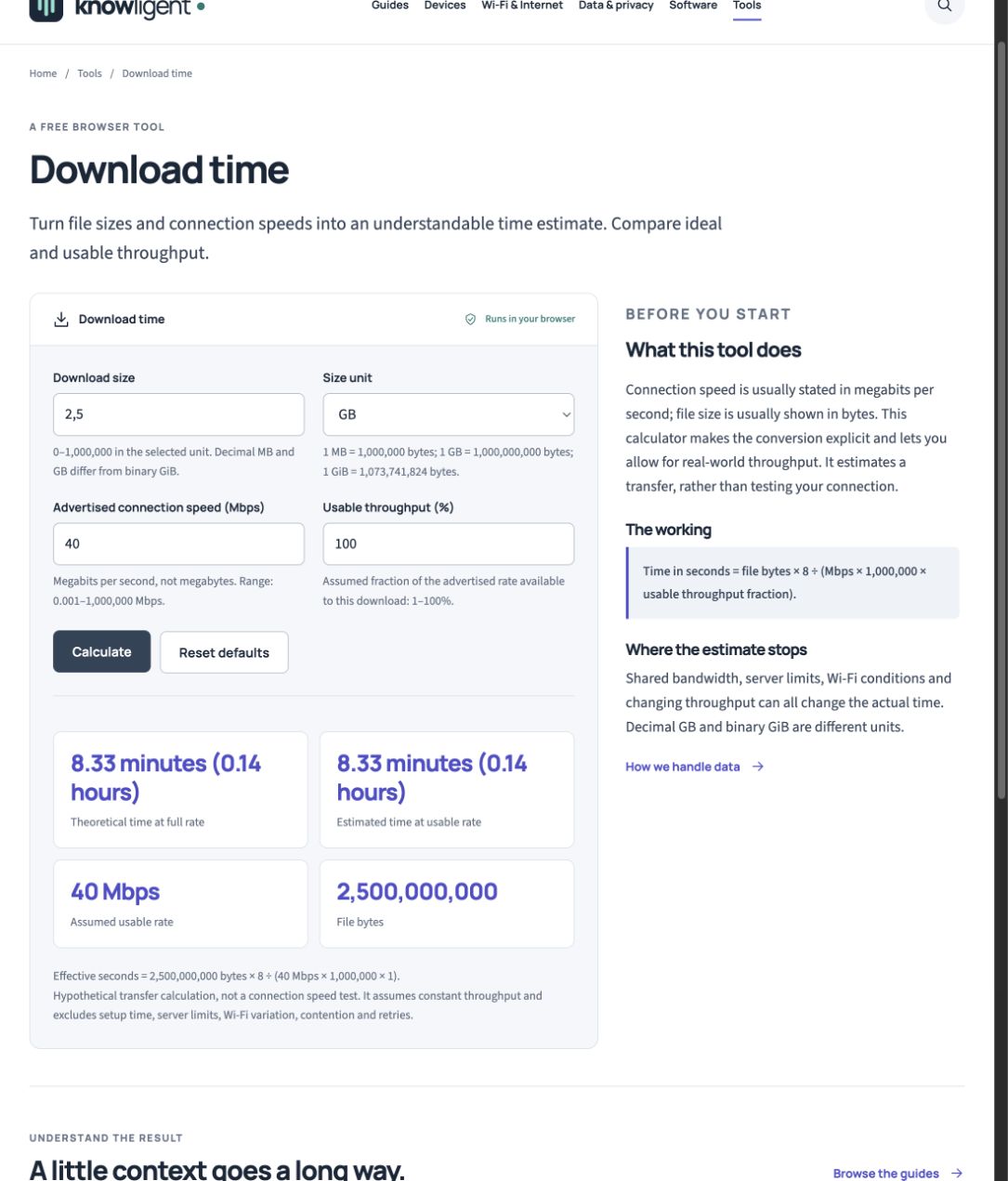
The working tool shows the same 2.5 GB archive at 40 Mbps and 100% assumed usable throughput: 2,500,000,000 bytes and 8.33 minutes. This is calculated example data, not a speed measurement.
Version notes
Knowligent browser tool, current local working build inspected 31 October 2026. Fresh actual screenshot of the displayed state; no simulated device UI or measured performance claim.Now keep the size and advertised speed unchanged, set Usable throughput to 80%, and calculate again. The assumed usable rate becomes 32 Mbps and the estimated time becomes 10.42 minutes, corresponding to 625 seconds. The full-rate comparison remains 8.33 minutes. That isolates one changed assumption; 80% is an example, not a measured efficiency or a recommended discount for every connection. Reset defaults returns the tool's starting inputs without changing any network settings.
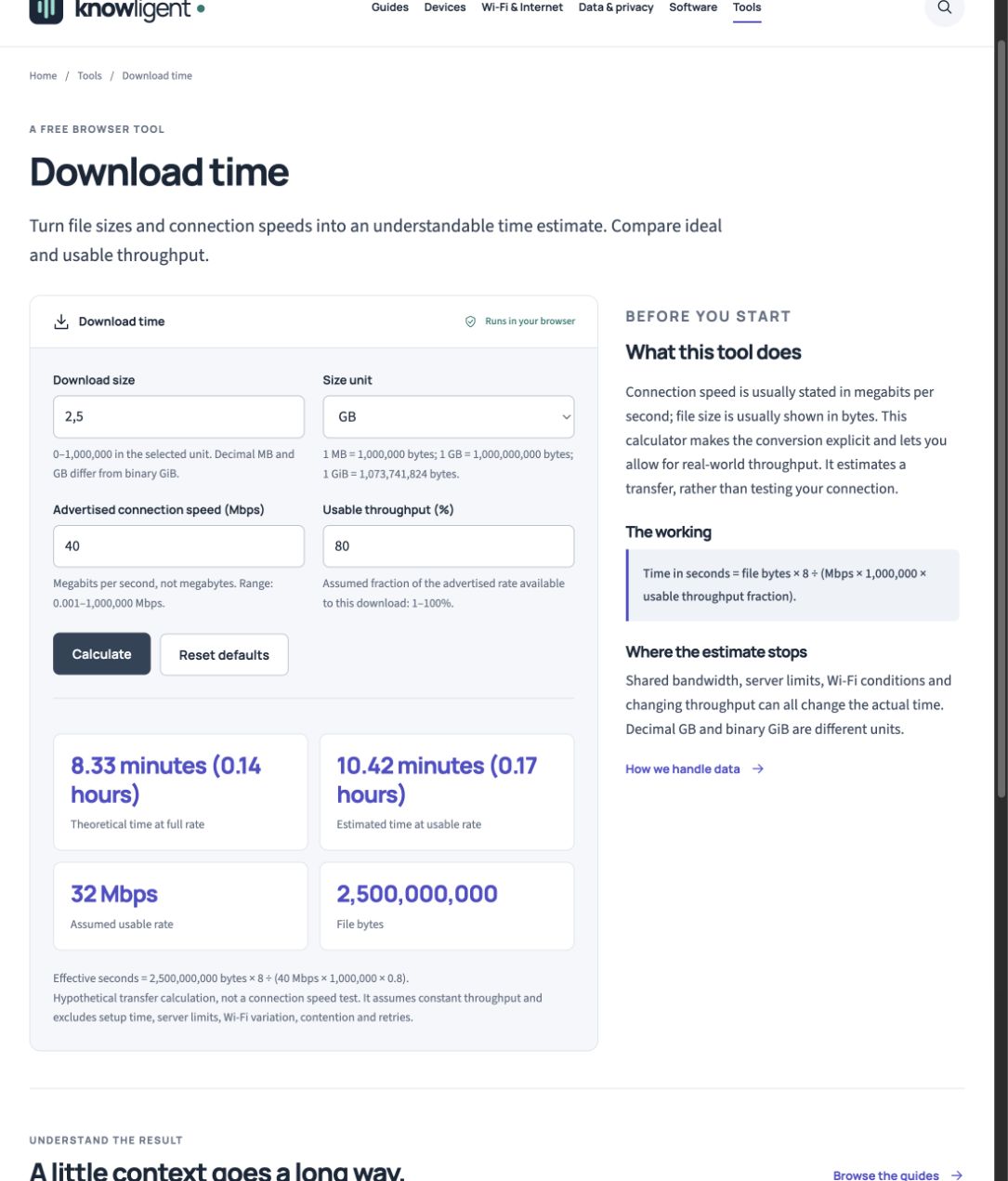
Only the throughput assumption changes to 80%. The tool shows 32 Mbps and 10.42 minutes while the theoretical comparison stays 8.33 minutes. Reset defaults is visible for returning to the initial inputs.
Version notes
Knowligent browser tool, current local working build inspected 31 October 2026. Fresh actual screenshot of the displayed state; no simulated device UI or measured performance claim.Sources, versions & scope
The steps describe the documented controls and expected checks; they are not a claim that every device or software release has been physically tested. Platform and version differences are stated with the procedure.