Start with the failure, then count the routers
A game reports double NAT, remote access fails, or a printer disappears after you add mesh Wi-Fi. Resist the temptation to disable every firewall. Network Address Translation (NAT) lets multiple local devices share an internet-facing IPv4 address. Two routers performing it in succession create double NAT; that arrangement alone does not establish the cause of every connection problem.
This guide covers an already configured TP-Link Deco system connected by Ethernet behind an ISP modem/router gateway. The documented app example is Deco X60; controls can vary with model and app version. The aim is to identify the routing layers and choose who should manage the network, while preserving a way back.
Write down one reproducible failure: the exact game warning, a particular remote connection, or a missing printer. Check ordinary browsing too. If everything works and only an advisory mentions NAT, there may be no useful change to make. If only speed is poor, compare a device connected to the gateway with one on Deco before attributing it to NAT.
Make a small address-and-cable record
Photograph the existing cable connections and note the gateway model, main Deco model, Wi-Fi names and administrator access method. Trace the main Deco cable back to a gateway LAN port. A second box could be a simple modem or optical terminal; its presence does not prove a second router.
- Connect your phone to Deco Wi-Fi. Open the Deco app and go to More > Advanced. Read the Operation Mode row without changing it. TP-Link's current example shows Wi-Fi Router.
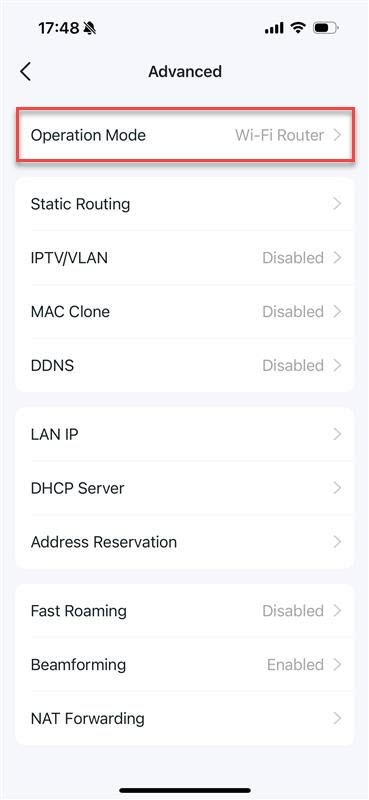
Visual 01 · TP-Link Deco app; official Deco X60 example Inspect before changing: this TP-Link example shows Wi-Fi Router as the current mode. The image establishes neither your mode nor double NAT.
TP-Link official support image, unchanged. Copyright TP-Link; not Creative Commons. Image sourceVersion notes
Current TP-Link FAQ updated April 17, 2026, with April 2, 2026 screenshot asset. Checked October 31, 2026. Exact app and iOS build undisclosed; screens may vary by model and app version. - Using the gateway's own documented administration route, read its internet/WAN IPv4 address and check whether routing and DHCP are enabled. DHCP is the service assigning local addresses. In its connected-device list, identify the main Deco and record its assigned address. This is the Deco's upstream address, not a satellite's management address.
- On a personal device using this home connection, compare the gateway WAN IPv4 address with the IPv4 address reported by an external IP-check service. For this comparison, an optional personal VPN or proxy must not be supplying the outward address. If one must remain active, mark the comparison inconclusive.
Hypothetical example: the gateway routes a 192.168.1.x network and assigns 192.168.1.20 to Deco. Deco is in Wi-Fi Router mode and assigns a laptop 192.168.68.25. Those are two local networks, consistent with two household NAT layers. They are examples to interpret, not addresses to enter.
Private IPv4 ranges are 10.0.0.0–10.255.255.255, 172.16.0.0–172.31.255.255 and 192.168.0.0–192.168.255.255. A private Deco upstream address is a clue; combine it with the gateway's routing state. Two Wi-Fi names or several private traceroute hops alone do not settle the diagnosis.
If the gateway WAN address is itself private, or lies in 100.64.0.0–100.127.255.255, ask the ISP about upstream NAT. RFC 6598 reserves that latter block for shared address space used with carrier-grade NAT. Removing a household router layer cannot remove the provider's layer. An unexplained WAN/external-address mismatch also warrants investigation, rather than a firewall change.
Choose the device whose protections you will keep
There are two sensible arrangements. TP-Link's existing-router guidance recommends bridging a combined modem/router to avoid double NAT. However, the right choice depends on which device supplies features you need.
- Keep Deco as the router
- Ask the ISP for the exact bridge-mode procedure for its gateway and your service. Deco continues handling routing. Confirm any required PPPoE credentials, VLAN settings, telephone or television dependencies, and the gateway's recovery access before changing it. This article does not prescribe a universal ISP menu.
- Keep the ISP gateway as the router
- Use Deco Access Point mode for Wi-Fi coverage. The gateway continues assigning addresses and protecting the internet boundary. This is the concrete procedure below.
Before choosing AP mode, review TP-Link's feature comparison for your hardware. Deco Antivirus, Parental Controls, QoS, HomeShield, address reservation and port forwarding are among the functions unavailable in AP mode. An existing schedule or rule will not automatically migrate to the gateway. If a household depends on one, establish an appropriate replacement or retain Deco routing.
Do not bridge both devices. Also avoid a DMZ-host shortcut or disabling endpoint firewalls: neither removes the two routing layers. Switching off gateway Wi-Fi alone changes radio coverage, not NAT. Keep wireless encryption enabled, and leave unsolicited inbound traffic blocked on the router you retain.
Use Access Point mode only after the gateway is ready
Arrange a brief outage and save open work. Confirm the gateway has working internet, enabled DHCP and its firewall enabled. Keep its login details and a direct LAN connection available for recovery. Record Deco reservations and rules that may need replacing.
TP-Link's current AP-mode instructions require an already configured Deco system and current app and firmware. Check firmware through More > System > Update Deco; complete any needed update as a separate maintenance task before changing modes.
- Keep the existing Ethernet link from gateway LAN to the main Deco. Leave satellite wiring unchanged. In the Deco app, return to More > Advanced > Operation Mode.
- Select Access Point. Review the listed functions that this mode does not support, then tap Save only if you accept that transfer of responsibility.
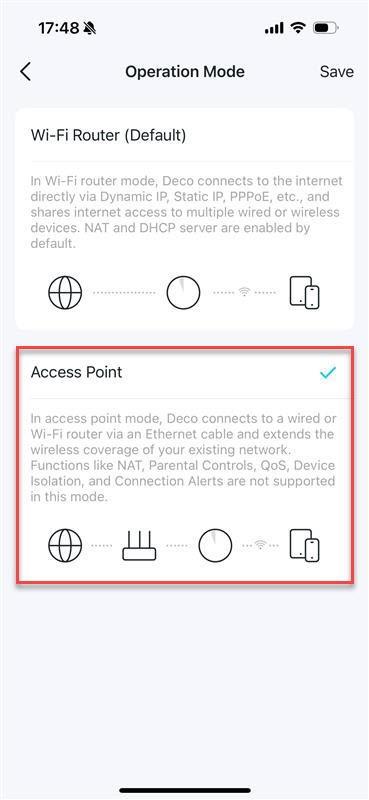
Visual 02 · TP-Link Deco app; official Deco X60 example Access Point is selected in this vendor example, before Save. The visible text lists functions lost in this mode; it does not show an applied change.
TP-Link official support image, unchanged. Copyright TP-Link; not Creative Commons. Image sourceVersion notes
Current TP-Link FAQ updated April 17, 2026, with April 2, 2026 screenshot asset. Checked October 31, 2026. Exact app and iOS build undisclosed; screens may vary by model and app version. - The confirmation says Deco will reboot when switching modes. Tap Reboot to apply the change, or Cancel if you are not ready.
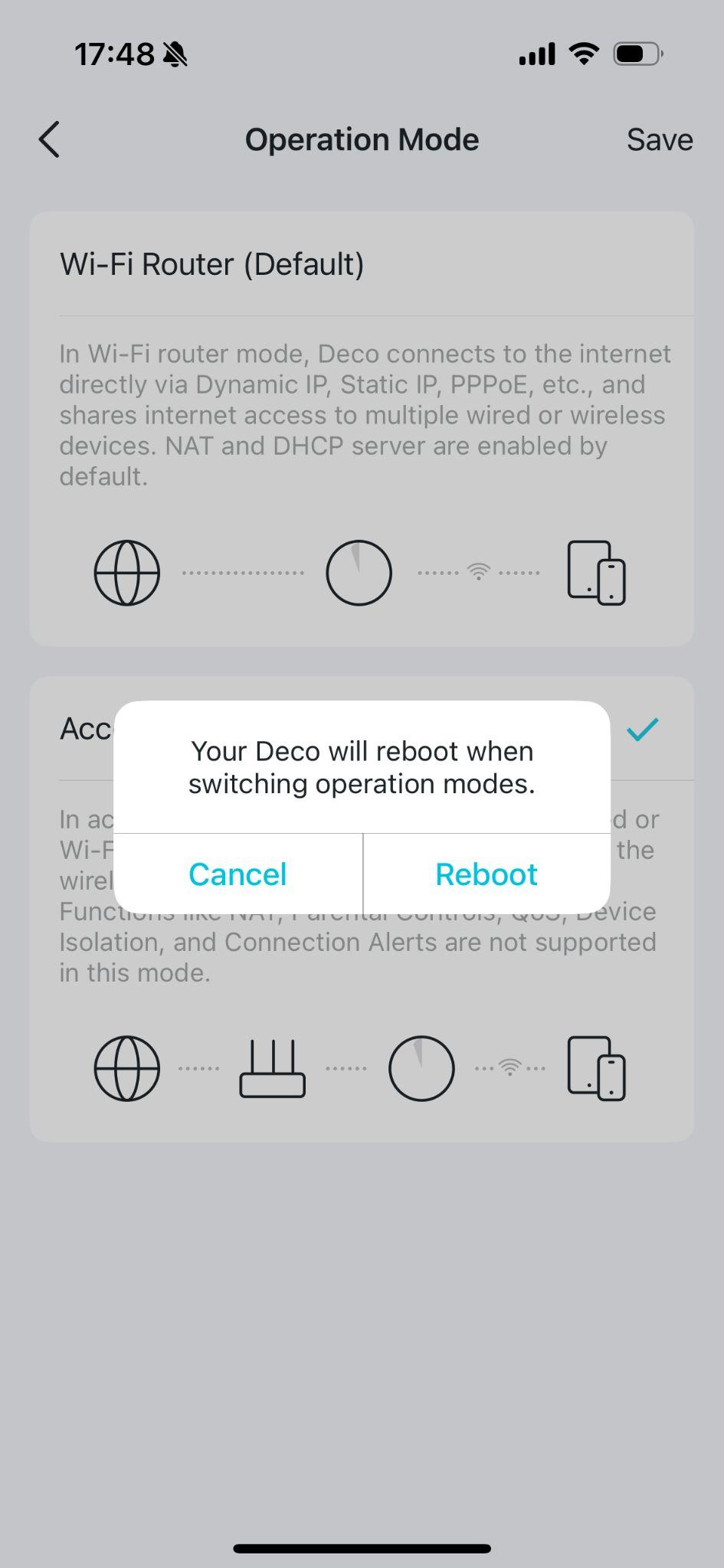
Visual 03 · TP-Link Deco app; official Deco X60 example Reboot applies the requested mode change; Cancel leaves this confirmation without proceeding. This is a pending vendor demonstration, not a completed network test.
TP-Link official support image, unchanged. Copyright TP-Link; not Creative Commons. Image sourceVersion notes
Current TP-Link FAQ updated April 17, 2026, with April 2, 2026 screenshot asset. Checked October 31, 2026. Exact app and iOS build undisclosed; screens may vary by model and app version.
Allow the restart to finish; the vendor's X60 example says about two minutes and a return to solid green. Follow your model's LED guidance. Reconnect the phone to Deco Wi-Fi and verify that Operation Mode now reads Access Point. The confirmation screenshot is an example of the pending change, not evidence your network has completed it.
Check the original task, with a clear route back
Reconnect one client so it obtains a fresh DHCP lease. Confirm it now receives an address and default gateway from the ISP gateway's network. In the hypothetical example, the laptop would move from Deco's 192.168.68.x network to the gateway's 192.168.1.x network; the exact address is not predictable. Printers with manually fixed addresses may need their network configuration revisited.
Repeat the original failing task on that client. Also check browsing, local printing and any parental restriction the household relies on. A successful game session does not verify those other functions. If the NAT warning persists, revisit the ISP WAN evidence and ask about carrier-grade NAT or a public IPv4 option. Do not add broad port rules just to make a status label change.
If clients have no usable address, connect through the gateway's LAN and check DHCP and the recorded cable path. If the gateway works but the AP arrangement does not meet your needs, reconnect to Deco and restore Wi-Fi Router under Operation Mode, save and accept its restart. Rejoin Wi-Fi and verify the earlier configuration and protections; do not assume every rule survived. Restoring router mode also restores the earlier double-NAT arrangement.
A factory reset is unnecessary for this diagnosis. If management access remains unavailable, preserve the cable record and contact the ISP or TP-Link with the models, mode changes and address observations. That evidence gives support a concrete problem without exposing passwords or weakening additional protections.
Sources, versions & scope
The steps describe the documented controls and expected checks; they are not a claim that every device or software release has been physically tested. Platform and version differences are stated with the procedure.